Briefs For 3D Rendering Services
A perfect project starts with a good brief. When all information is in place, 3D Artists can do their job fast, ask minimum questions and produce results that will go beyond your expectations. Want impeccable CGI and smooth workflow?
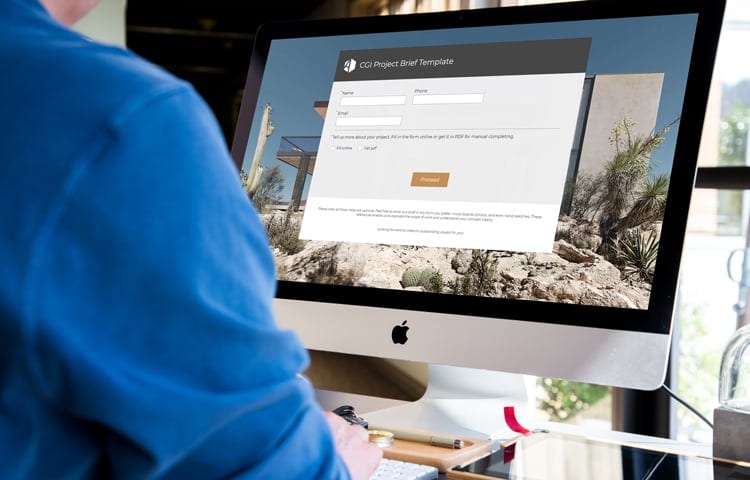



A well-prepared project brief is essential for establishing smooth cooperation. It outlines the project details, providing the team with valuable information they need to produce a stunning 3D visualization. To make this process as straightforward as possible, we’ve created a comprehensive 3D rendering services brief template for you to fill out.
Interior 3D Rendering Brief
When preparing an interior 3D rendering brief, it’s important to include key details about the functional zoning of the space and style preferences. For example, you can specify whether the design leans towards minimalism, classic style, or something entirely unique. Style references, such as mood boards, material swatches, or photographs, are especially helpful for ensuring the visuals align with your vision. These inputs give our specialists the info they need to create renderings that truly reflect your goals.
Exterior 3D Rendering Brief
For exterior 3D rendering, the brief requires additional specifics to ensure accuracy and precision. Details such as project location, floor plans, elevations, and landscaping requirements provide valuable context. You can also indicate particular features you’d like emphasized or include references for surrounding environments. Furthermore, specifying preferred camera angles or perspectives allows us to craft visuals that highlight the most compelling aspects of your design.
Level of Detail and Final Quality
The level of detail you provide in your brief directly influences the quality and efficiency of the final output. A thorough brief helps us understand your expectations, avoid potential revisions, and deliver exceptional results that align with your vision.
Take a Little Extra Time
We recommend taking a little extra time to complete the brief as comprehensively as possible. This ensures that every aspect of your project is clearly communicated, enabling us to meet and exceed your expectations.
Start by downloading our template today and let’s get started on bringing your architectural concepts to life!
Get the Brief3D Rendering Brief FAQ
What is a 3D rendering brief?
A 3D rendering brief is a short document that describes your project for the 3D artists: what needs to be visualized, which drawings and references you have, the style you want and the views you need. With this information in one place, the team can quote the project accurately and start work without a long round of questions.
What is in the ArchiCGI brief template?
The template asks for your contact details, the project type (exterior visualization, interior visualization or animation) and a description of the project. You can fill it in online or get it as a PDF and complete it by hand.
What files should I send with the brief?
The most useful references are drawings, architectural or design sketches and mood boards. For plans and drawings, CAD, PDF or another vector format works best, and ready 3D models can come as STL, 3DS, MAX or OBJ files. For an interior, add style references and material swatches. For an exterior, add the site location, elevations and landscaping plans. See what to include in an interior rendering brief and which references an exterior brief needs.
Do I have to fill in every field?
No. All fields in the template are optional. You can also send a brief in any form you prefer: mood boards, photos or even hand sketches. These references are enough for us to evaluate the scope of work and understand your concept.
What happens after I send the brief?
A client manager reviews it and sends you a quote with a fixed price and a delivery date within an hour. Once you agree on the quote, a dedicated team starts the project in our CGI CRM, where you see the drafts, leave comments and approve the final renders. Two rounds of revisions are included.
How long does a project take once the brief is complete?
Standard still renders take 48 hours from prepayment and a complete brief. Large projects can take up to 5 business days. A full brief saves time here: the fewer questions the team has to ask, the sooner production starts.
Is there a guide to filling out the brief?
Yes. Our guide on how to fill out a 3D rendering brief has checklists for interior and exterior projects, four ways to show camera angles and the most common mistakes to avoid.